Showing posts with label S40 TRICKS. Show all posts

Aug 19, 2013

→ PLAY MP4 VIDEOS 360p IN LOW END JAVA MOBILES (TESTED ON S40)-19 AUGUST 2013

This is a tutorial focused on how to play mp4 videos 360p in low end java mobiles (tested on s40)
Requirements:
Any Windows OS
Format Factory click here
Any s40 device
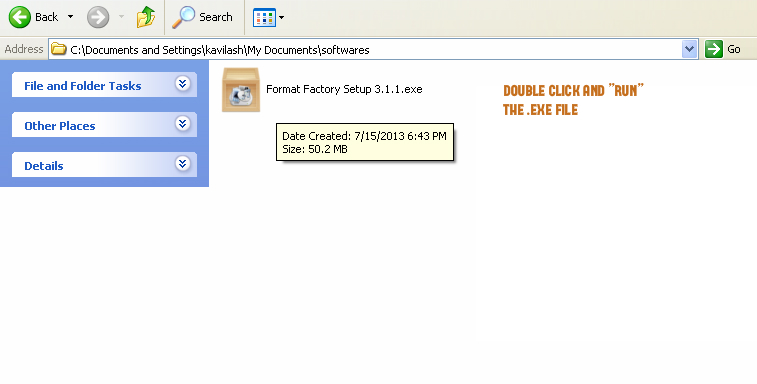
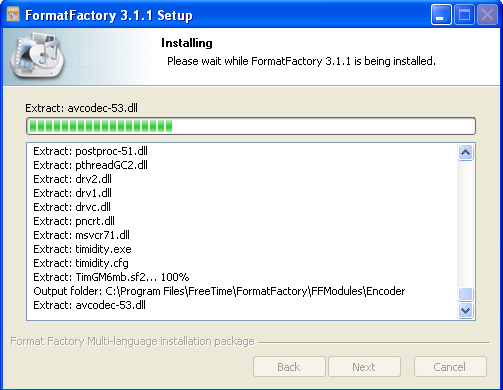
the .exe will extract the files and start installing in your pc
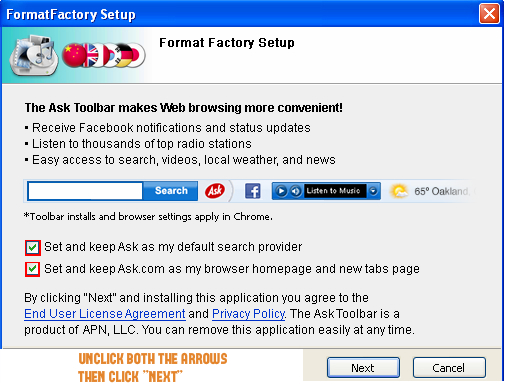
then the software will ask you to install ask toolbar plugins unmark and click next
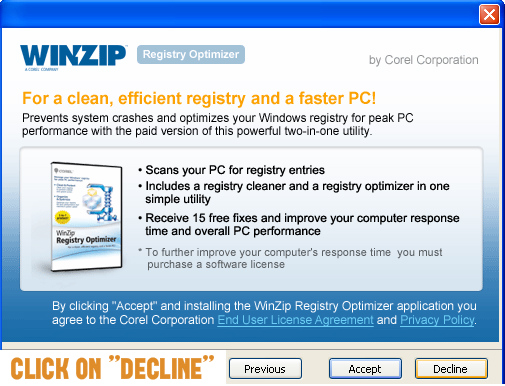
it will ask you to install winzip click on decline
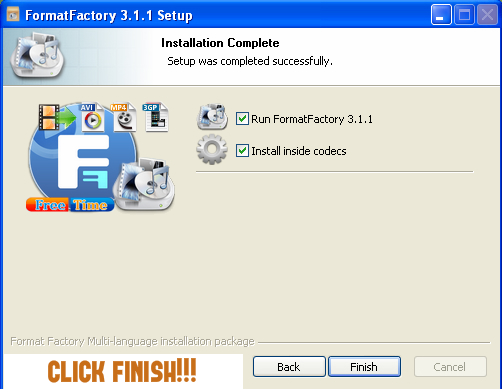
now installation is completed click finish
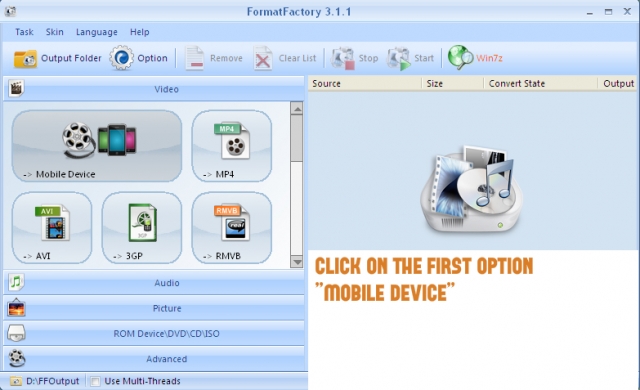
this is the home screen of the software click on the first box mobile device
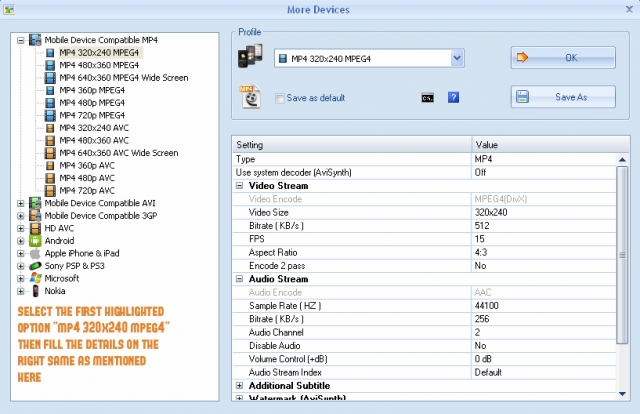
then you need to choose the first option mp4 320x240 mpeg4 and add the following details on the right side
video size: 320x240
bitrate (kb/s): 384/512/768 (more bitrate larger size and better quality)
fps: 12/15
aspect ratio: 4:3
sample rate (hz): 44100
audio stream (kb/s): 256
then click ok thats
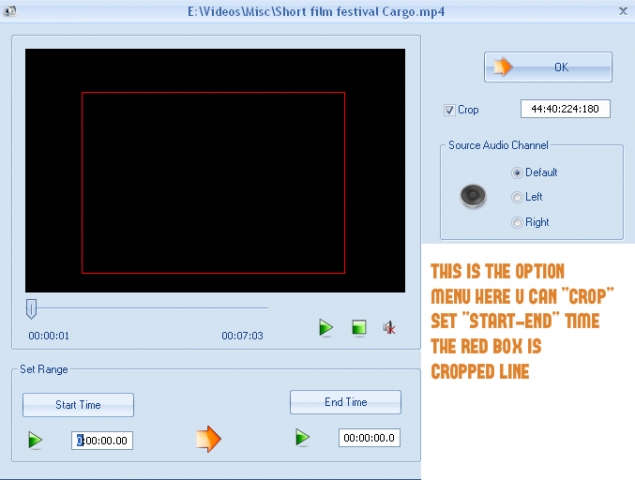
follow the next step as shown in the image
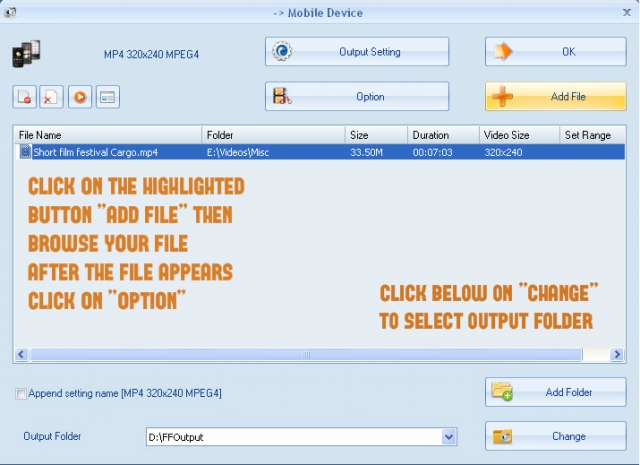
this is the option menu follow the instruction and click ok
the last step just click on start
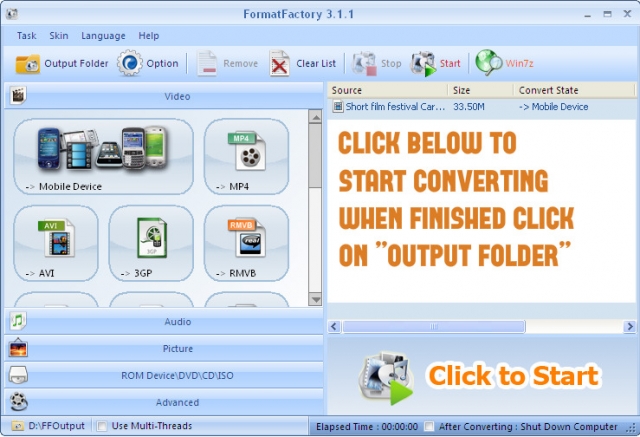
the mp4 file that didn't work in your device will now start working.
this was focused only on low end mobiles.
but there are many otherformats which you can customize and convert depending on your device.
it has an image, audio converter, dvd ripper, audio and video joiner
all for free
no hidden cost
no trial period
just complete full version and the best free converter out there
hope this helped you

→ INCREASE YOUR JAVA S40 NET SPEED [SIMPLE WAY]-19 AUGUST 2013

Hello everyone, I met high speed internet in my s40 phone yesterday and I would like to share that with you all.
This is just a simple way.
Everyone wants to surf net in your PC, but belief me you will forget that.
So, here it goes, Connect your phone to Nokia PC Suite(in case on Nokia),Samsung Suite(in case on Samsung)

Since I tested it on Nokia and Samsung phone. So, I am talking about Samsung and Nokia
You can try and tell if anyother Company phone works.
Ok, after connecting your phone, go to connect to internet and chose the uncommon settings for your phone for connecting to net.

My was Aircel(Assam) and I tried Aircel Chennai settings(in pc suite) and that worked with high speed net.

In case another net settings doesn't work, then try with suitable settings.
Now, after getting connected. All you have to do is surf net with your s40 phone and experiencing high speed net. I didn't met high download speed with that but, try with yours.
so, best of luck. Enjoy if that work

Jan 29, 2013

→ ACTIVATE ORANGE HOME SCREEN IN S40V5 PHONES-29 JANUARY 2013

As we know we can easily activate orange home screen in s40v3 phones,but in case s40v5 it was believed that it will be very difficult to activate orange home screen as Nokia removed this features in its latest phones...
But, where there is a will there is a way!
You can activate orange home screen in your s40v5 easily,just follow the procedure...!!
1.Replace Variants_defaults.wbxml in c:/hiddenfolder/isasettings with file attached here.
2. Reboot your phone.
3. Now go to settings>>display and you will find new item orange home screen here.
4. Turn it on and orange home screen will appear on your phone but there will be no text in menus.
5.First download ppm of any s40 v5 or v6 phone released by orange homescreen compatible phones like 2730 or 6303 etcthen you can copy and paste the entries from that ppm into your ppm with ppmod as mentioned in the tutorial.
Download Navifirm for downloading.ppm files of phones like 2730c.
6. Now add text in ppm and flash it.
(Tutorial to add text in ppm is attached here.)

ACTIVATING HOMESCREEN IN S40V5 PHONES

Here is the file which we have to replace with original one.
Variant default by TricksLive.tk.zip
Done..!!


Dec 21, 2012

→ TAKE SCREENSHOT IN NOKIA S40 PHONES USING NOKIA SCREEN DUMPER-21 DECEMBER 2012

Here is a simple method to take screenshots using nokia s40 phones.
Q) What do u think is a screenshot ?
Ans- Screenshot is important for a
theme maker. Screenshot has
function to display the theme
that we have created so it can
make other people interested in our theme. Generally, Website
that provide free themes like
eseth.net, tekhseven.net and
mobile9.com also require the
uploader to include screenshot
of their themes. Taking
screenshots s60 phone is easy,
but for s40 phone sis a bit
difficult.I too suffered the same prob..
But now we can do it easily with
Nokia
Screen Dumper , a simple
software to take a screenshot of
your s40 phone.
*.Just follow
these simple steps:

1. Download Nokia Screen
Dumper :
*.Nokia Screen Dumper By TricksLive.tk.zip
2. Deactivate all Nokia-
related-software (Nokia PC
Suite, Nokia Ovi Suite,
Nokia Software updater,
etc).
3. Run Nokia Screen Dumper.
4. Connect your phone via
USB, and choose PC Suite
mode/Ovi Suite.
5. Back to Nokia Screen
Dumper, choose : File –
Connect (a pop up box will
appear notify that
connection is succeeded)
6. To take a Screenshot, click
DUMP.
7. To save the screenshot
click SAVE, choose PNG
format for the best result
(recomended).
8. If you finish taking your
screenshot, choose : File –
DIsconnect.
This is a screenshot of my Nokia
2730 while using Nokia Screen
Dumper :

And the result was-