Showing posts with label NOKIA TRICKS. Show all posts

Jul 31, 2013

→ TUTORIAL TO USE .PROVE FILE ON S40 PHONES [ GPRS SETTINGS ]


Here is a Detailed Tutorial on How to use FREE GPRS settings on your s40 Device ( Nokia ).After blocking all older GPRS tricks by the service providers, We are giving you tricks based on GPRS Configuration. All the older tricks were worked by tweaking the Host on the connection between Application and server. But now the Service providers started to monitor the connection. They now blocks the connection which having free server as Host. Now all the tricks based on Host are not working. But the FREE IP is not blocked by the service providers. So you will still get the PROXY Tricks working fine. Now we concentrated on the same proxy tricks to give Working free GPRS trick even with Handler Modded Apps.
Note: If you have any other handset other than NOKIA's s40, then you don't need to read this tutorial.
Why only S40 ?We already said that new tricks based on Handler mods are working only by using PROXY tricks. Every phones other than nokia's s40 can create Manual Access Point with proxy and port. But s40 phones can't create manual settings with proxy in Access point. It can define only access point name and Packet Data access point. So we have to use a .PROV file in nokia s40.
How to use PROV file in s40 ?
How you receive settings from your Service Providers ?
When you request for gprs settings to customer care, they send you a prov file ( via air ) which defines all the access points, home page, proxy, port etc..
So when you use PROV file in your phone, you cant just copy paste or download it from the internet. You should transfer it via AIR. You can transfer it either via Bluetooth, Infrared or as MMS.
Step #1 :Download .PROV file to a phone or your PC.
Step #2 :Now send that downloaded file to Your Phone via Bluetooth.
Step #3 :Now you will receive Configuration settings on your Mobile. Just save it and set that as default settings.
You can do it going to Settings » Configuration» Active Default in all Applications.
Done !
Tutorial at a Glance :
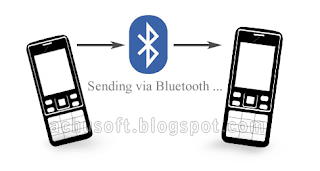
Prov files can be send from one phone to another via Bluetooth
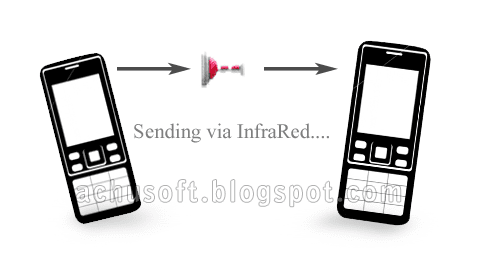
Prov files can be send from one phone to another via INFRARED
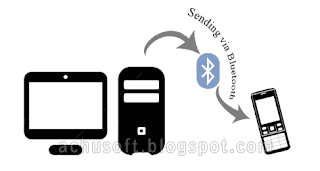
Prov files can be send from PC to your phone via Bluetooth or INFRARED
Hope you understand something about usage of PROV files.
If you are having problems, feel free to ask it.


Jan 29, 2013

→ ACTIVATE ORANGE HOME SCREEN IN S40V5 PHONES-29 JANUARY 2013

As we know we can easily activate orange home screen in s40v3 phones,but in case s40v5 it was believed that it will be very difficult to activate orange home screen as Nokia removed this features in its latest phones...
But, where there is a will there is a way!
You can activate orange home screen in your s40v5 easily,just follow the procedure...!!
1.Replace Variants_defaults.wbxml in c:/hiddenfolder/isasettings with file attached here.
2. Reboot your phone.
3. Now go to settings>>display and you will find new item orange home screen here.
4. Turn it on and orange home screen will appear on your phone but there will be no text in menus.
5.First download ppm of any s40 v5 or v6 phone released by orange homescreen compatible phones like 2730 or 6303 etcthen you can copy and paste the entries from that ppm into your ppm with ppmod as mentioned in the tutorial.
Download Navifirm for downloading.ppm files of phones like 2730c.
6. Now add text in ppm and flash it.
(Tutorial to add text in ppm is attached here.)

ACTIVATING HOMESCREEN IN S40V5 PHONES

Here is the file which we have to replace with original one.
Variant default by TricksLive.tk.zip
Done..!!


Dec 21, 2012

→ TAKE SCREENSHOT IN NOKIA S40 PHONES USING NOKIA SCREEN DUMPER-21 DECEMBER 2012

Here is a simple method to take screenshots using nokia s40 phones.
Q) What do u think is a screenshot ?
Ans- Screenshot is important for a
theme maker. Screenshot has
function to display the theme
that we have created so it can
make other people interested in our theme. Generally, Website
that provide free themes like
eseth.net, tekhseven.net and
mobile9.com also require the
uploader to include screenshot
of their themes. Taking
screenshots s60 phone is easy,
but for s40 phone sis a bit
difficult.I too suffered the same prob..
But now we can do it easily with
Nokia
Screen Dumper , a simple
software to take a screenshot of
your s40 phone.
*.Just follow
these simple steps:

1. Download Nokia Screen
Dumper :
*.Nokia Screen Dumper By TricksLive.tk.zip
2. Deactivate all Nokia-
related-software (Nokia PC
Suite, Nokia Ovi Suite,
Nokia Software updater,
etc).
3. Run Nokia Screen Dumper.
4. Connect your phone via
USB, and choose PC Suite
mode/Ovi Suite.
5. Back to Nokia Screen
Dumper, choose : File –
Connect (a pop up box will
appear notify that
connection is succeeded)
6. To take a Screenshot, click
DUMP.
7. To save the screenshot
click SAVE, choose PNG
format for the best result
(recomended).
8. If you finish taking your
screenshot, choose : File –
DIsconnect.
This is a screenshot of my Nokia
2730 while using Nokia Screen
Dumper :

And the result was-


Nov 19, 2012

→ HOW TO BYPASS NOKIA'S DRM [COPY .JAR FILES TO ANOTHER PHONES]

How to Send java Games and Apps. from Nokia phone to another Nokia phone wihout showing Error
[ Bypassing Nokia's DRM ]
If you download a Game or Application on a Nokia phone and try to send the software to any other phone, you may see that the game or software will not run on the other phone. This is Due to Nokia's DRM ( Digital Management Rights ). They are doing so to avoid unauthorized copying of Softwares.
Today we are giving you a simple trick to Bypass Nokia's DRM.

Bypass Nokia's DRM from your Pc :
Simply Download the desired game or application froma Pc and send it to your phone via USB,bluetooth or Infr-red.
Bypass Nokia's DRM from your Phone :
First of all You need to Install UC Browser to your phone.
Just Click on the Download link of the file.
Then you will get a new page asking How to Download
From that Press Save ( Dont press Install )
Then it will ask where to save file
Just Select some location and press Download Next procedure is Important
After Downloading finished, go to the Downloaded location.
You will see a unsupported file there as something like name_jar
Press options > Rename and Just change _ to .
That means your new name should be name.jar instead of name_jar
Done !!
Now you can Install it on any phone without getting error.

Jul 5, 2011

NOKIA_THEME_CREATOR(S60_nd_S40)


File Name:-Nokia_theme_creator(s60_&_s40)_v3.4_english.exe.rar
File size:-165.68MB

DOWNLOAD

NOKIA SECURITY CODE VIEWER


First of all download file below and
then connect your nokia phone using usbcable and then
open file
It's portable version so not need to install
now click on services and then click get on user code secation

File Name: nokia security code viewer.rar
File Size: 678.18 KB


DOWNLOAD

Jun 22, 2011

HOW CAN I ADD MORE LANGUAGES TO NOKIA MOBILE PHONE SOFTWARE

We open ppm containing the language necessary to us, for this purpose we press Open
We develop a tree ppm, for example the Italian language is necessary to us, we press on it the right button Export to xml
The same it is made in item AORD and LDB
We save result, now Open ppm which will go to phone to insert fonts in it . In opened ppm delete unnecessary languages from TEXT
AORD and LDB.
Now we select TEXT and right click on it and press Import fromXml and insert the saved language
Then we repeat same for operation with AORD and LDB
Now see the following picture, our language is under the item end, that is very bad. Press the right button on inserted languageand we choose UP. This is all , As usually we repeat AORD and LDB
After all three items are on places, we press Create PPM (after pressing it do not touch computer better, for 30-40 seconds) then it will ask to choose a place to save. Now ppm is ready to flash.