VPN4ALL IS THE ONLY BEST FASTEST VPN AVAILABLE IN THE MARKET WHICH DOES NOT DISCONNECTS WHILE SWITCHING/CHANGING SERVERS OR IP ADDRESSES:-
VPN4ALL IS A FASTEST AND EXTREMELY SECURE VPN AVAILABLE IN THE WORLD NOW A DAYS.THEY HAVE SERVERS IN ALMOST ALL THE TOP COUNTRIES.THOUGH VPN4ALL PROVIDES THE SIMILAR FEATURES OTHER VPNs DO,SUCH AS PPTP/OPENVPN,MORE SERVERS,1000+ OF IPs,FAST SPEED AND BLAH BLAH BLAH.
BUT THE REASON BEHIND THAT WHY I CHOOSE VPN4ALL OUT OF ALL OTHER VPNs IS " VPN4ALL DOES NOT DISCONNECTS WHILE SWITCHING/CHANGING SERVERS,AND,HENCE DOES NOT REVEALS OUR REAL IP TO THE WEBSITES ".
Since Last Month,I Was Trying To Find A VPN,Which Should Not Disconnect Us From The Internet " For A While " During Switching Or Changing Between Different Servers.Because,When We Change IP Address Using A VPN,The VPN Connection ICON Disappears From Our Desktop's System Tray,Means That VPN Server Is Disconnected,And The Only Available Server There Is " Our ISP Server ".This Is Very Dangerous Fault Of A VPN,Because If It Disconnect Us While We Are On A Restricted SiteOr Doing Something Wrong And Thinking That We Are Secure,Then Our Real IP Address Will Become Visible For A While During IP Change Process.
For A Simple And Better Understanding To See That " How Our Real IP Address Becomes Visible While Changing/Switching The VPN Servers ",Just Consider A Below Example.
Suppose I Have Bought,Installed And Ran A " VPN1 ".And Connected Through Its UK IP Address.And,ILogin To A " Flash Chat Site ",Which Has A IP Tracking System At Its Homepage.And They Traced My IP(VPN's IP) That Is 222.222.222.222.
Then After 10 Minutes,I Switched The VPN Server From UK To USA Or Simply Changed IP.
As Soon As I Change Servers,The Chat Will Disconnect ,This Shows That VPN Is Disconnected,And My Real IP Will Become Visible To That Chat Site Tracker For Few Seconds.Suppose They Traced My Real IP 111.111.111.111
Now,I Got A USA IP And Connected To The Chat Again,The Tracer There Located My IP As 333.333.333.333 .
This Show That,Most Of The VPN Available In The Market Reveals/Leaks Our Real IP Address " While Switching Server ".
NOW COMPARE THE ABOVE PROCESS USING VPN4ALL:
Firstly I Bought A 1 Month Account At VPN4ALL Website And Got The Access Code.
Secondly I Have Installed The VPN4ALL Client On My PC Then Started It.
Thirdly I Have Entered My Access Code In The Box.
Fourthly,I Clicked Options Menu There,And Set The Different Options Like PPTP Or Open VPN Servers,Forced IP Change Etc.Then I Saved The Settings And Clicked Connect To A Specific Server.
And I Logged Into A Flash chat Website.It Traced My IP Address As Suppose 111.111.111.111 (USA).
Now I Switched Server From USA To CANADA.The Chat Was Still Connect And Have My IP Address 111.111.111.111 .
Then,As Soon As VPN4ALL Shown Me That Your IP Is Changed,I Quickly Open The Same Chat In A New Window,And At This Time,The Chat Server Tracked My IP As 222.222.222.222 (Canada).
Wow,In The Above Process,VPN4ALL Did Not Revealed/Leaked My IP Address At Any Moment.
The VPN4ALL Have A Strong GUI Client And The Fastest Servers,So That's Why During IP Change Process,Our Real IP Will Not Become Visible To Any Web Server.
And Hence The VPN4ALL Is The Safest VPN Server In The World For 100% SECURE BROWSING .
*. Some Features Of VPN4ALL:- Thousands Of IP Addresses Available To Use.
You Can Also Assign A Specific IP Address For A Particlar Login.Means 1 Specific IP For A Websites That Does not Allow To Login When Our IP Changes.
P2P VPN Strong And Fast Servers.
Fast 24/7 Hour Support For Any Kind Of Problems.
Cheap Plans.(About 10$/month).
*. Note1:- Though There Is Are VPN Providers,Whose VPN Blocks OurISP Data While Changing/Switching IP Addresses,But The VPN4ALL Is The Best Choice In My Opinion Amongst Them All.
*. Note2:- I Had Not Bought This VPN,One Of My Friend Samy Helped Me,He Bought VPN4ALL,Tested It,And Sent Me The Shots,So,The Credit Goes To Samy,Not Me. Go To VPN4ALL Website From Here
Thank You!!!!
Wait is Over Now...
I am going to tell how to use Any Vpn in android mobile without any restriction.....
Before Starting anything create a zip file with the config your want use......
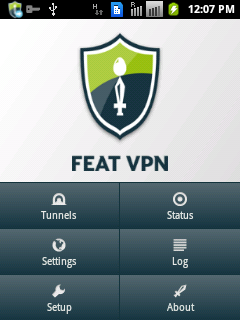
*Now Go HERE and download: After Install Open FeatVpn:
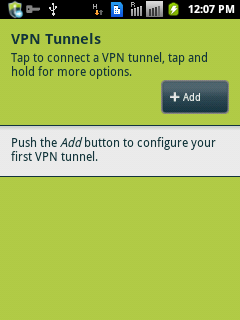
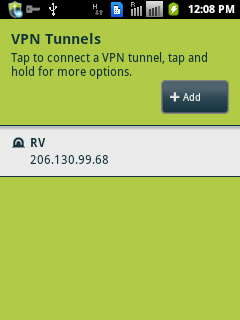
*Now Click on tunnels:
*Clink On Add:
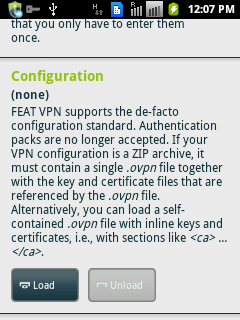
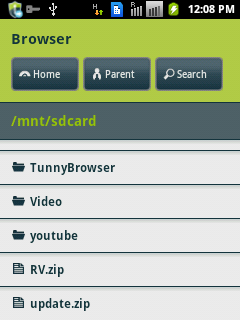
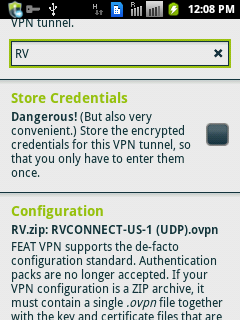
*Select the Zip file Created with theconfig As I selected RV.zip
*It will automatically select related files like keys etc.
*Click on back and select the config
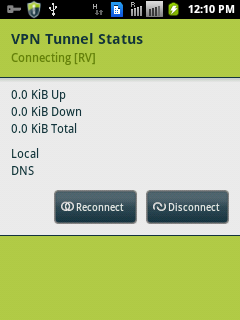
*It will start connecting
Very soon it will ask for the authentication details..
Enter the details..
And you will be connected Soon
*Now Enjoy Unlimited without any restriction (depends upon the Vpn server and cofig you are using)
Free VPN is virtual private network software for Windows that allows you to surf web freely and securely keeping no logs. If you are living in China or the Middle East countries, then Free VPN should work perfectly without any hassle.This VPN tool can unblock websites and it assures of greater flexibility and offers you extra security.
Free VPN is a remote access software works at full internet speed compared to other VPN tools which would decrease speed and performance of PC drastically when employed.
The interface looks good with drag-n-drop facility. You must provide a valid e-mail addressand username to access the VPN servers and the remaining things are easy to handle. You can easily connect and disconnect the servers while working them. As said earlier, Free VPN doesn’t show impact on the web browsing speed and bandwidth as well. Features:
*. You could access even blocked websites which are restricted in some countries orareas.
*. Cover up your computer identity by changing IP address smartly and access websites of your choice.
*. The connection is encoded with 128-bit encryption algorithm which stands between you and the internet.
*. No traces or logs of your online activities are recorded.
*. You could view web content of USA sites like streaming videos or TV shows from other countries which are restricted due to regional problems.
*. You can download files with ultimate speed.
*. Connect to the server instantly without much wait.
*. The installation iseasy and interface is flexible to use.
*. The servers work with great speed.
*. 24x7 Live support.
Finally, Free VPN is absolutely free which comes with more than 1400 minutes of free access. Later, you can subscribe for monthly plan which is offered at reasonable prices. As this software is free, it has some limitations and it would be unlocked when you subscribefor monthly or yearly plan. Information:
*. Version – 2.1
*. Setup File Size – 2.7 MB
*. Price – Free
*. Operating Systems – All Windows OS versions Download Link
Recently I came across the VPNs and I posted two articles about it.In my First post about VPN and Proxy sites I mentioned How to Connect and Configure a Proxy Site ,After that a Post about PD proxy VPN service mentioned that How to get free 100 MB daily for any mobile Operator service.
Today I am Posting a List of VPN and Proxy Sites which may Help you to Choose suitable proxy and VPN according to your Need for Accessing free Internet and Browsing Privately.
Here We Go:
*Julyrush VPN :
Trial-> 3 Days
Protocols:-PPTP, L2TP
OpenVPN
https://billing.julyrush.com
*ivpn:
Trial->7 days
protocols:- L2TP, OpenVPN
http://www.ivpn.net/
*12vpn:
Trial:-7 days
Protocols->PPTP, L2TP, SSL
OpenVPN, SSTP
https://12vpn.com/
*HotSpot Shield VPN :
Trial->unlimited
Avalible In -> UDP
http://www.hotspotshield.com/
*Expat Shield VPN:
Trial->Unlimited
Avalible In -> UDP
www.expatshield.com
*PD-PROXY VPN :
Read Review
Trial-> 100MB day/3months
Avalible In ->UDP,TCP,ICMP
http://www.pdproxy.com/index.htm
*Tsunami VPN :
Avalible In -> TCP,UDP
protocol->OpenVPN
Free User- 1 month
www.tsunamivpn.com/
*Kebrum VPN :
Available In ->UDP,TCP
https://kebrum.com/en/
*Free Uploads VPN :
Available In -> TCP
http://www.freeuploads.fr/
*Genesis VPN :
Available In ->UDP,TCP
http://www.genesisnet.com
*VillaVPN :
Available In ->UDP,TCP
vpnvilla.com
Mullvad :
https://mullvad.net/en/
*bilkent VPN :
I have seen many of our visitors asking ...
1. How to connect vpn
2. Where to paste config
3. Password cannot be read
So here's a basic tutorial only for newbies and those who dont know how to manage and use key and cert files
Watch this video,it will help you a lot:-) http://www.youtube.com/watch?v=0R2tPdzCmt0
or here is a basic vpn tutorial kit:-) http://www.mediafire.com/?cf8qkh9h7kb20d8
I hope this is the proper time for such tutorialsMore tutorials... will be added soon after positive response or if required
2---
steps
1.download the openvpn or nmdvpn
*openvpn http://swupdate.openvpn.org/downloads/shield/openvpn-connect.msi
*nmdvpn http://billionuploads.com/os6zuw2ql90a
2.install
3.now go to
for xp users
c>program files>openvpn(or nmdvpn)>config
for win7 user
c>program files (x86)>openvpn(or nmdvpn)>config
paste your config here
4.now run the openvpn(or nmdvpn) as administrator Note- right click to run as administrator
5.after that the openvpn(or nmdvpn) will minimise in window tray at bottom left corner
6.right click on that openvpn (or nmdvpn) in windows tray
7.select the server (config files u added) which u want
8.connect
9.done:-)
Hello guys,
Here is the latest Shield VPN modified with working ports - 52,53,8080,9201
Just download the Shield VPN from
below and connect it with your working port....and Enjoy!!
Download Shield VPN from HERE
1. Create a new VPN connection
Press the Home icon, press Menu , and tap Settings . Tap Wireless & networks and then tap VPN settings.
Tap Add VPN
Select PPTP VPN.
Login to your control panel http://vpn.hidemyass.comand navigate to your PPTP page to find server details. Fill in VPN details such as VPN name, VPN server, etc. Remember your PPTP password is different and shown in your control panel. 2. Connecting to the VPN
Press the Home icon, press Menu, and tap Settings
Tap Wireless & networks
Tap VPN settings (figure 2 above)
The VPN connections you have added are now listed
Tap the VPN you wish to connect to
A dialog box will open asking for your credentials, enter them and touch connect
When connected to a VPN, you will see an ongoing notification in the Status bar on your HTC Desire. If you should get disconnected, you will receive a notification and anoption to go back to the VPN settings. 3. Connecting to the VPN
Simply open the notifications panel at the top of the screen on your HTC Desire and click on the VPN notification, then tap disconnect.


 Click Here




 More tutorials... will be added soon after positive response or if required


