Many visitors ask me to give zbigz premium account !! here it is enjoy !!!!
Using Zbigz.com gives you access to the network which contains hundreds of thousands of movies and other videos, musical albums , books and applications .
Zbigz is a gateway between huge data storage (BitTorrent network) and you. You do not need to download and investigate complicated software. It is possible but Zbigz has already done it for you. Just input your search query or choose what you need from our regularly updated catalogue and download it!
Okay, now You want a premium account for zbigz ? Yes we bring here for free !!! just look all the steps below for Firefox user and Chrome user
=> For Mozilla Firefox Users-
Download Cookie Manager Plus : CLICK HERE
Go to Zbigz
Log Out If already logged in
1. Click on Tools>Cookie Manager +
2. Search for zBigz

3. Click On PHPSESSID and Edit

4. Change the Value Given By Me and Save
5. Reload The page.
=> For Google Chrome Users
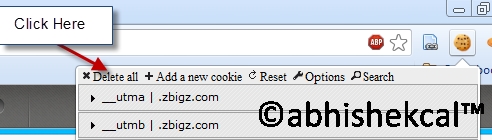
1. Goto Chrome Store download extention called Edit this Cookie :
CLICK HERE
2. After installing Edit This Cookie go to zbigz.com and Logout if u are already logged in (Important)
3. Open "New tab"
4. Click on the Edit this Cookie icon

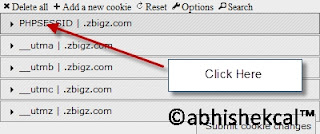
5. Search " zbigz "

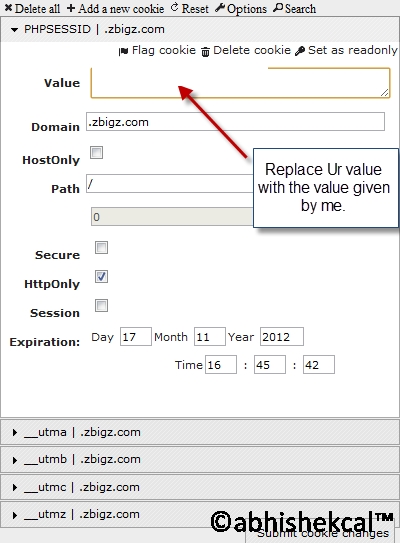
6. Select Cookie Named with “ PHPSESSID ” And Click On It

7. And paste the value :

AND Again Reload the page and wait for few seconds till page loads fully and U see premium ON

=> NOTE-
Please Do Not Log out, Otherwise the cookies will stopworking
DOWNLOAD (download premium Cookie)
 CLICK HERE TO DOWNLOAD
New cookie will be updated soon..