


Download :
OperaMini7_TricksLive.tk.apk
Now open the handler UI application.
Tick Enable handlerUI and disable socket options
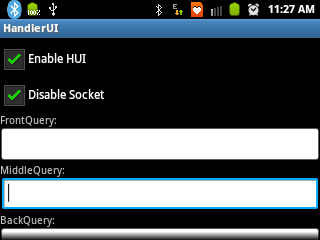
Set frontquery as: 10.11.233.29. (dont forget the dot(.) at the end)
Now click on options > save
now click on options > minimize
Now download and install Opera Mini 7 handler application . This Opera Mini will install seperately. If you have Opera Mini already installed, this Opera willnot replace it.
Download:
TricksLiveHUI.apk
Now install it and open it.
Use apn: portalnmms (you have disable background data in settings. otherwise network will not be connected)
After initialisation, Go to Options > Settings > Advanced > Protocol
Set protocol as HTTP
Now enjoy free internet invodafone. Change network mode to WCDMA/UMTS mode to enjoy 3g speed!
Note: The Application HandlerUI must be running in background whenever you want to access free Internet using Opera Mini. You can launch it and minimize it before opening Opera Mini anytime.
